Built from within care

The Operating System
for Care PlansRosteringIncidentsMedicationTrainingComplianceSafeguardingReporting

Care One OS brings the whole care environment into one joined-up digital system. Built from real experience inside care, it reduces paperwork, removes duplication, strengthens oversight, and gives teams more time where it matters most.
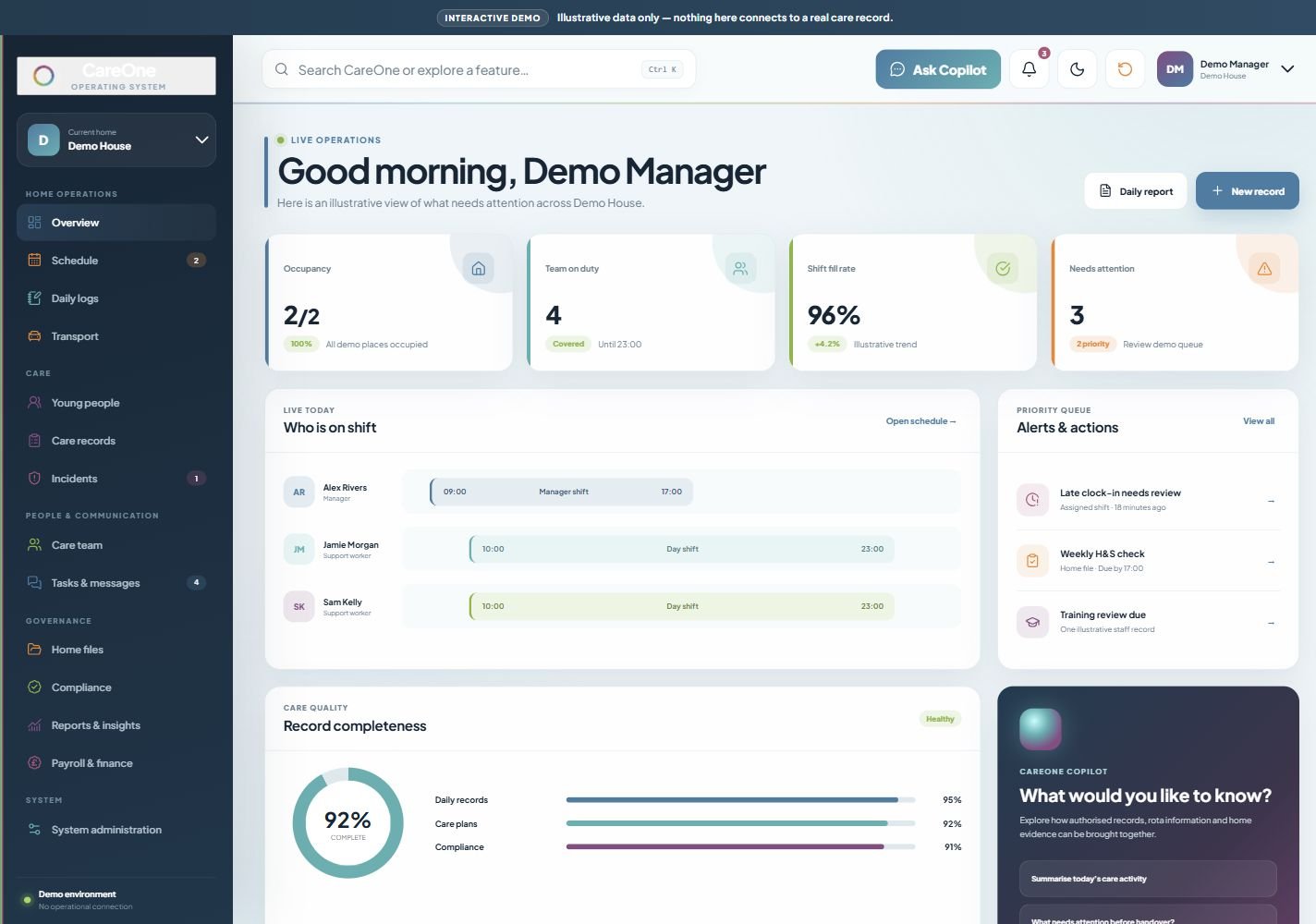
Care One OS · Overview
New Care One OS overview dashboard with occupancy, staffing, shift coverage, alerts and record completeness, shown with illustrative Demo House data
Team on duty
4Covered
Shift fill rate
96%Filled
Record completeness
92%Complete

Care One Copilot + AI tools

AI support, built into everyday care.

Care One Copilot and our built-in AI tools help your team find answers, prepare plans and reports, and turn paperwork into structured records. Less time on administration, with your team reviewing and approving the work.

  • Ask your records

    Find information about care activity, staffing and home operations using everyday questions.

  • Start with a draft

    Prepare care plans, behaviour support plans and reports for your team to review.

  • Bring paperwork together

    Extract information from uploaded documents without retyping everything.

  • See what matters

    Summarise daily records to support handovers and management reviews.

Explore AI for your team
Care One OSDemo House
Handover workspace

Ready for the next shift?

Open each priority, then mark it reviewed.

0 of 3 reviewed3 need review
  • Weekly health & safety check

    Needs review

    Home file · Due by 17:00

    View record
    Weekly Health & Safety Check

    Fourteen of sixteen sample checks are complete. The demo manager needs to review emergency contacts and outstanding actions before completing the check.

    Owner: Demo Manager
  • Late clock-in needs review

    Needs review

    Assigned shift · 18 minutes ago

    View record
    Shift attendance

    A sample clock-in is later than the assigned shift start. Review the attendance record and the recorded explanation before deciding the next step.

    Owner: Demo Manager
  • Training review due

    Needs review

    Care team · Review before handover

    View record
    Staff training record

    One illustrative staff training record is due for review. Check the evidence and agree a follow-up with the team member.

    Owner: Alex Rivers · Demo manager

Try reviewing a priority. Nothing changes outside this preview.

Explore two guided workflows from the new Care One OS interface. Your team reviews the work.

Explore the connected platform

See in action

Choose an area, open a feature and try its interactive HTML preview.

01 / 04

Run the home

Keep the day running, from staffing and journeys to repairs.

Run the home

Overview

See occupancy, staffing, shift coverage, priority actions and record completeness together. Explore how managers can move from an overview into the records that need attention.

Watch Overview in action
Run the home

Rostering & scheduling

Explore the weekly and monthly rota, staff availability, open shifts and shift details. See how connected scheduling supports clearer handovers and day-to-day staffing decisions.

Watch Rostering & scheduling in action
Run the home

Transport

Explore planned journeys, vehicle checks, driver allocation and travel information in the demonstration transport workspace.

Watch Transport in action
Run the home

Maintenance

Try the maintenance command centre: filter the job queue, open a repair, assign a team member and update its status. Add a fictional repair and see the dashboard respond.

Watch Maintenance in action

02 / 04

Care & support

Keep everyday recording, support plans and care follow-up connected.

Care & support

Daily logs

Try recording a fictional daily entry, filtering the timeline by person and reviewing the information behind the day. Copilot-assisted workflows keep the team involved in checking the record.

Watch Daily logs in action
Care & support

Care records

Explore care plans, behaviour support plans, risk assessments, placement plans, keywork and planning documents. Open fictional records, review their detail and try the guided editing tools.

Watch Care records in action
Care & support

Incidents & safeguarding

See how incidents, safeguarding concerns and management review can be recorded and followed up in one workspace, with clear ownership and human oversight.

Watch Incidents & safeguarding in action
Care & support

Medication

Medication workflows bring administration records, stock information and audit trails together. The interactive medication preview will be added separately.

Preview coming soon

03 / 04

People & money

Bring the team, communication, payroll and insights together.

People & money

Care team & training

Explore staff profiles, availability, training, development and compliance information, with a connected view of the care team.

Watch Care team & training in action
People & money

Tasks & messages

Explore shared tasks, messages, ownership and updates. See how everyday communication stays close to the work it relates to.

Watch Tasks & messages in action
People & money

Payroll & finance

Explore the payroll dashboard, sample timesheets, approval states and finance reporting. Open branded timesheet previews and try the demonstration export controls.

Watch Payroll & finance in action
People & money

Reports & insights

Explore operational, care, weekly and compliance report previews. See how connected information can support management reviews and planning.

Watch Reports & insights in action

04 / 04

Governance & resources

Find the documents, tools and oversight behind a well-run service.

Governance & resources

Home files

Open fictional home documents, Regulation 44 reports, Regulation 45 reviews and health-and-safety checks in the demonstration document workspace.

Watch Home files in action
Governance & resources

Form builder

Try the browser-based form builder: add fields, set required information and inspect a live preview using fictional demonstration content.

Watch Form builder in action
Governance & resources

Auditing & compliance

Explore compliance status, training checks, document readiness and actions that need review. Bring the evidence together to support your team’s oversight.

Watch Auditing & compliance in action
Governance & resources

System administration

Explore roles, permissions, active users, home assignments and module settings in the fictional administration workspace.

Watch System administration in action

All previews use fictional information. Medication’s preview is coming soon.

Voices from within care

Better connected.
Closer to care.

Space for experiences from the people behind the care, in their own words.

Preview content. These are sample testimonials for this design preview, not approved customer endorsements.

Placeholder testimonial
Care teams need a clear picture of what is happening across their service. Bringing the information together can make it easier to spot what needs attention and support people well.
Mick CarterSample attribution · Awaiting approval

Connected care, different settings

Industries we work in

One joined-up platform for the people, records and operations behind care.

Residential care

Bring daily recording, care plans, rotas and oversight together for residential teams.

Supported accommodation

Support independence with clear plans, shared records and joined-up staff coordination.

Domiciliary care

Coordinate visiting teams, schedules and care information across people’s homes.

Day centre

Keep activities, attendance and team communication connected throughout the day.

Our Story

About Care One OS

Built in care. Built for care.

Our journey started not as a tech company, but as a successful children's residential care provider. As an Ofsted Outstanding organisation, we understand first-hand the standards, pressures and responsibilities that come with delivering high-quality care for children and young people.

Day in, day out, we experienced the same frustrations many providers face — systems that were overly complicated, disconnected from real care practice, and time-consuming for staff already under pressure. We knew there had to be a better way: a system that truly reflected the realities of working in children's homes.

So, we built one.

Care One OS has been designed by people who genuinely understand residential care. Every feature has been shaped by the challenges we have faced ourselves — from safeguarding and compliance demands to rota management, daily recording, medication, reporting and oversight.

Our aim is simple: to reduce unnecessary admin, streamline day-to-day processes, and give valuable time back to carers so they can do what they do best — care for children, build meaningful relationships, and help young people thrive in the best possible way.

Care One OS · Residential care overview
Care One OS residential overview

"This isn't just software. It is a solution built from within care itself."

We understand the pressure on providers because we live it every day. That is why Care One OS is practical, intuitive and focused on what really works — helping children's residential care providers stay compliant, improve oversight, support staff, and deliver the highest standards of care with confidence.

Give your team one system that works the way care works

If your service wants better visibility, stronger compliance, smoother operations and more time back for care, Care One OS is the platform built to support that.

Free 14-day trial No credit card required UK cloud hosted

Frequently Asked Questions

Common questions about Care One OS and how it supports care providers.

What is Care One OS?
Care One OS is a digital care management platform designed to connect the core functions of care delivery into one secure, role-based system. It gives providers a single source of truth across care, staffing, compliance, education, clinical information and operational management.
Who is Care One OS built for?
It is built for children's residential care, supported living, multi-home care groups, operational managers, care staff, compliance teams, training teams, education and clinical functions, and leadership teams that need live data, accountability and inspection readiness.
Can I manage multiple care homes from one account?
Absolutely. Our Professional and Enterprise plans include multi-home dashboards with unified reporting, cross-home staff scheduling, and centralised compliance tracking across all your locations.
How long does it take to set up?
Most homes are up and running within a day. Our onboarding team handles data migration, staff training, and configuration so your team can focus on what they do best — caring for people.

Register Interest

Built from within care. Designed for better care. Register your interest and see how Care One OS can support your service.

Email us
hello@careoneos.ltd
Head office
40-42 Kemble Street, Prescot
Liverpool, L34 5SQ